Google
DocsでBlog Comment Sheetをつくりましょう。
2. Click on "CREATE" on the upper left-hand side of the screen.
3. Click on "Spreadsheet" under the "CREATE" menu.
4. Make the four columns (Date,
Blog URL, Name, and Country/School, etc.) as shown below.
5. Next, click on "File", and rename the spreadsheet.
Make sure the title includes your name.
Click OK when done.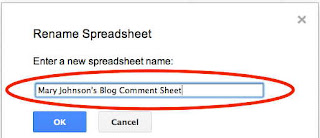 6.
Then, Click on "File", and
share this comment sheet with your instructor.
6.
Then, Click on "File", and
share this comment sheet with your instructor.

In the box "Add people", put
your
instructor's gmail address.
Click on "Share & save" when done.
えぐち先生:shigeru.eguchi@gmail.com
まつい先生:kyoko.loetscher@gmail.com
ぱく先生 :parkjisuk3@gmail.com
たつみ先生:naofumi.tatsumi@gmail.com
Make sure that your instructor now has the
access to your comment sheet. Then, click "Done".
7.
Move the cursor on the left of your spreadsheet title to show the arrow
to go back to Google Drive.
Click on it.

8.
Now you should have the blog comment sheet in “My Drive”.
From now on, please keep a record about your
comments so that you can share it with your instructor.
Also, make sure to put the URLs of other's
blogs where you have made comments.


